Your data is encrypted before it leaves your premises, stored in data centres in Germany, and every backup run is monitored. In an emergency we bring back individual files or your entire data set. We operate the backup ourselves, as a processor under the GDPR; a cloud connection is set up only at your express request.
Data is encrypted on your own system. On our backup server it is stored in encrypted form only.
Stored in Germany
Your backups are kept in data centres in Germany. We run the service ourselves, as a processor under the GDPR.
Every run monitored
Every backup is logged and checked. If a run fails, we investigate the cause.
Quickly back in an emergency
Individual files, whole folders or a server's complete data set – to a different location if you wish, so that nothing is overwritten.
01
Two routes, one promise
How we back up
Route A
Servers in our data centre
Backup with Proxmox Backup Server
Incremental backup with deduplication: only what has changed is backed up, and identical data is stored only once.
Fast restore of entire virtual servers and of individual files.
Regular verification of the backups.
Route B
Systems at your premises and databases
for example practice and office servers, MS SQL Server or MariaDB
Backup with Bacula
Data is encrypted on your system before it is transferred securely to our data centre.
Running databases are backed up consistently and can be restored individually.
Retention in several generations; on request, an additional backup in a second data centre.
What we promise, on both routes
Stored in Germany: Your backups are stored in data centres in Germany – a cloud connection is set up only at your express request.
Operated by us: Netsource Data Systems operates the backup itself.
Data processing under the GDPR: We process your data as a processor under the GDPR.
02
What it gives you
Systems at your premises and databases
For systems at your premises and for databases we use Bacula, an open-source backup solution proven for more than 20 years. What you get:
Encrypted before the data leaves your premises
Your data is encrypted on your own system, with a separate key for each customer. Only encrypted data is stored on our backup server.
No open ports at your site
Your system opens the connection to us itself, secured by TLS (an encrypted connection). No inbound access has to be opened in your firewall.
Generations following the grandfather-father-son scheme
An incremental backup every day, a differential one every week and a full backup every month. We keep daily backups for 30 days, weekly ones for 8 weeks and monthly ones for 12 months, plus one annual backup.
Built for databases
We back up running databases consistently, that is in a coherent state: on Windows via the Volume Shadow Copy Service (VSS), and for MS SQL Server and MariaDB additionally via database exports. Individual databases can be restored selectively.
Every run monitored
Every backup run produces a log with result, data volume and duration. We see failed or unusual runs and follow them up.
Restore when you need it
From individual files to a server's entire data set, to a different location if you wish so that nothing is overwritten. If you like, you can restore yourself via a web portal with two-factor sign-in.
Restore verified
Before going live, we carry out a test restore. A documented restore test with a report, for example once a year, is available as an option, charged by effort.
Compressed and checksummed
Data is stored compressed. For every file we record a checksum that allows us to verify that backed-up and restored data match.
Clean client separation
Every customer has a separate, isolated area with its own storage and its own key.
Option: backup in a second data centre
On request, we additionally copy your backups to a second data centre at another location. We quote the price in our offer.
Grows with you
We add further servers or more data without rebuilding anything. You pay for the storage actually occupied.
Open source, proven for more than 20 years
No licence fees per device and no tie to a vendor. In use with us for Windows Server and Linux.
What about the cloud?
Technically, Bacula can also be connected to S3 storage such as AWS. We set this up at your express request. We do not recommend it: for the sake of data sovereignty, your backups are best kept where we operate them ourselves — in data centres in Germany.
03
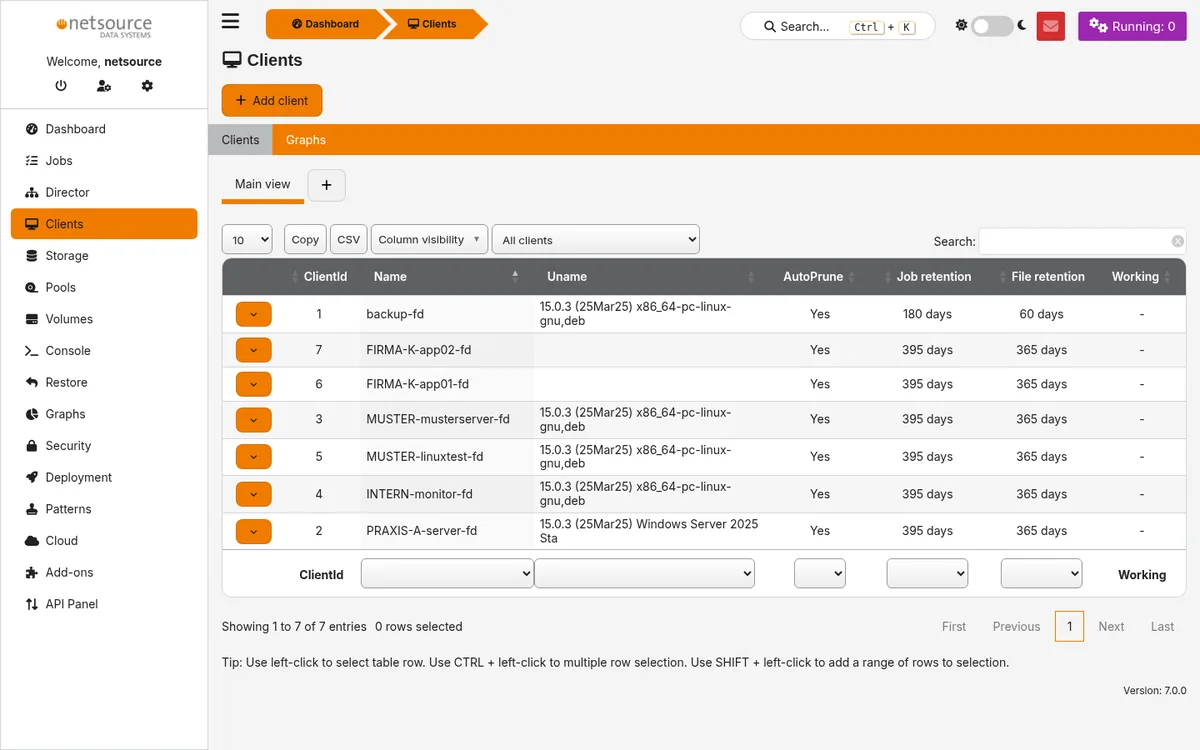
A look inside Your backup
5 views
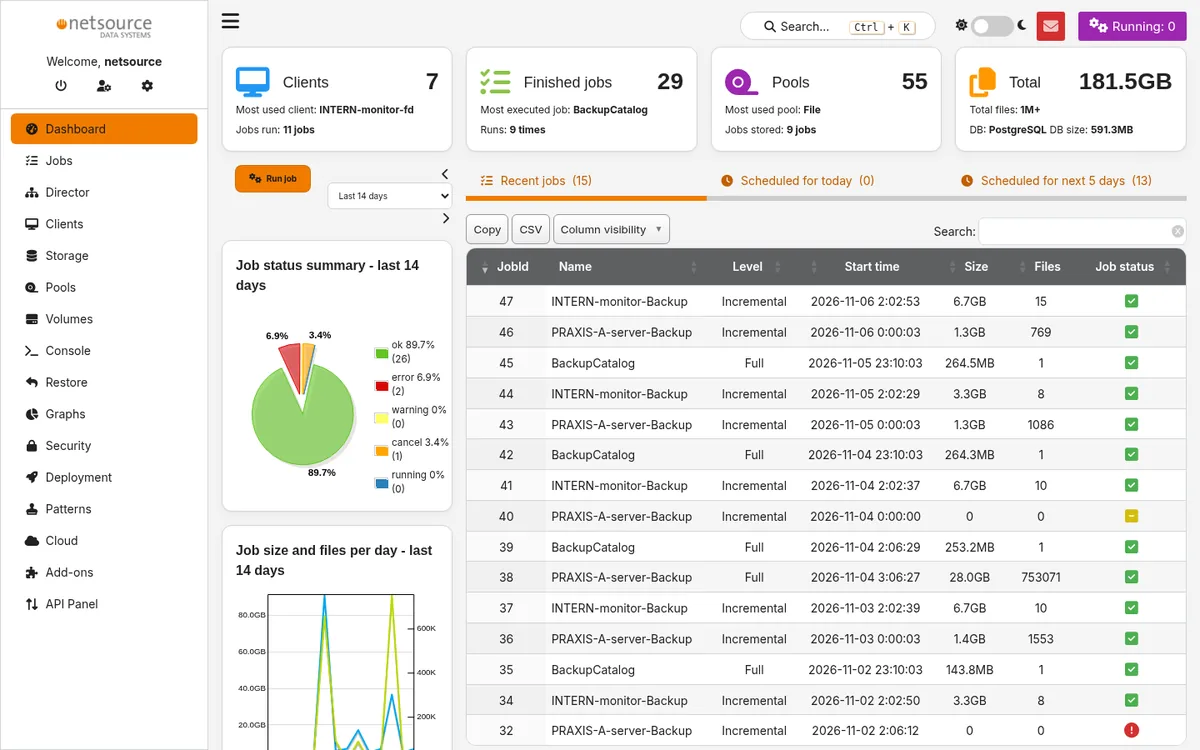
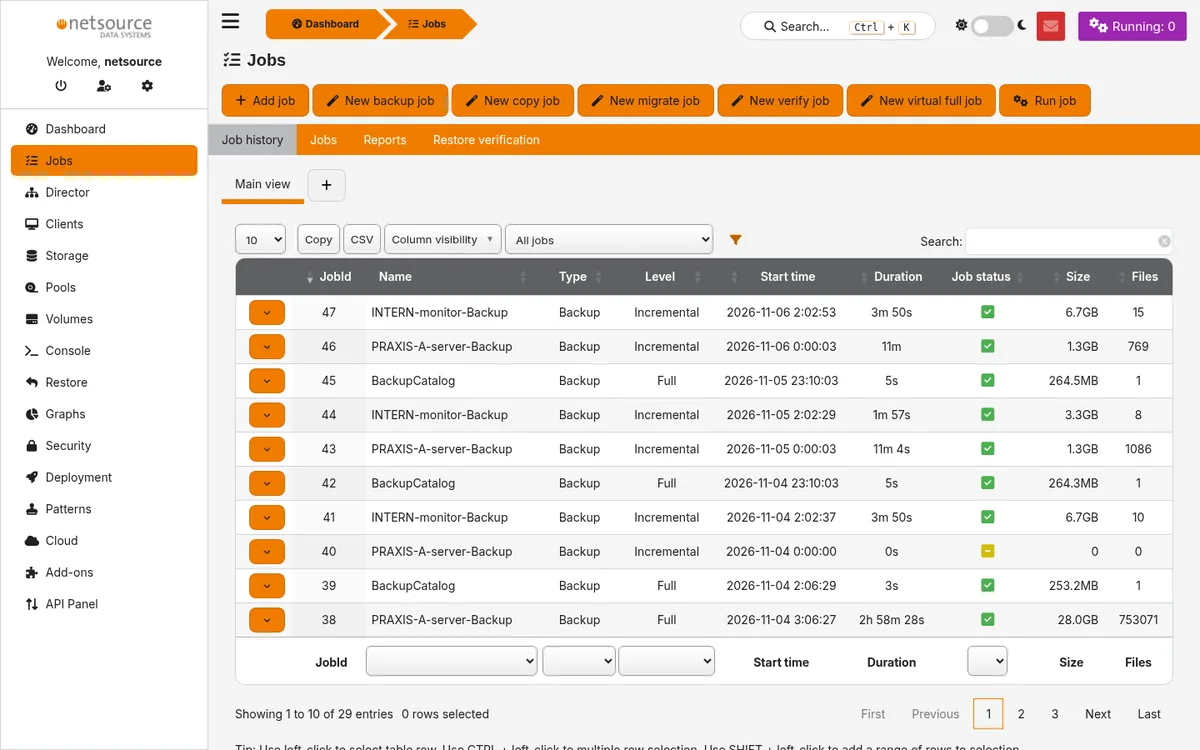
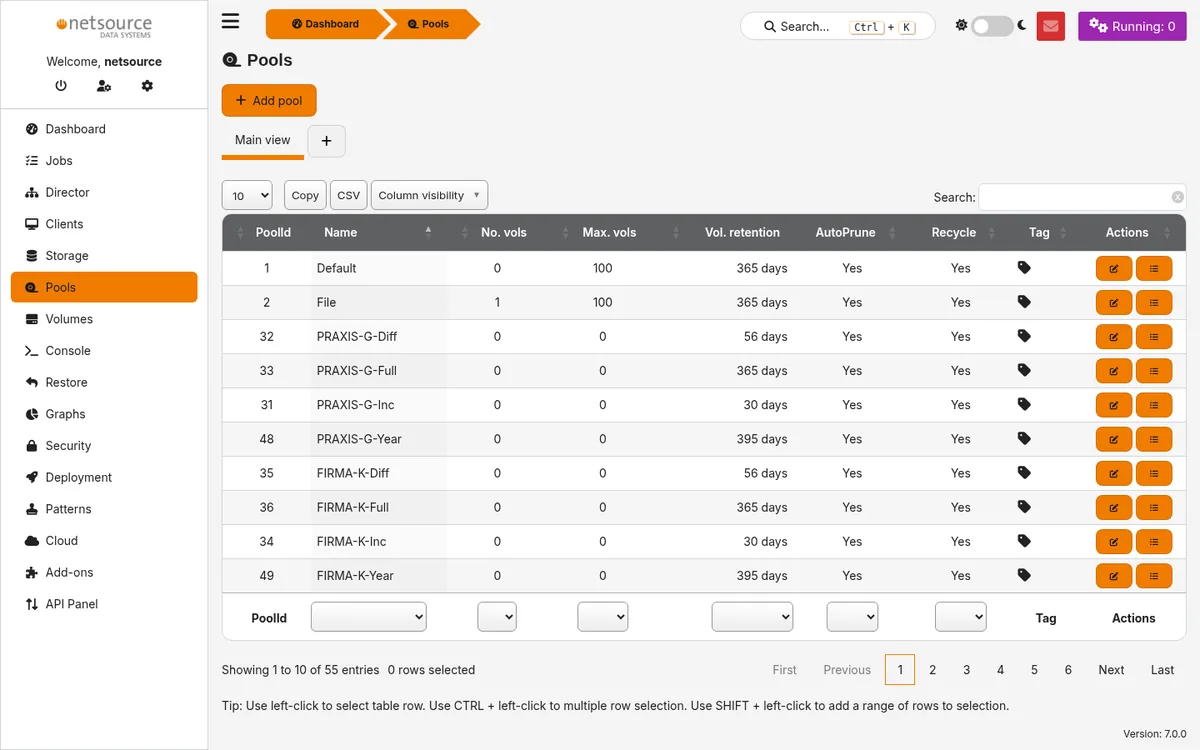
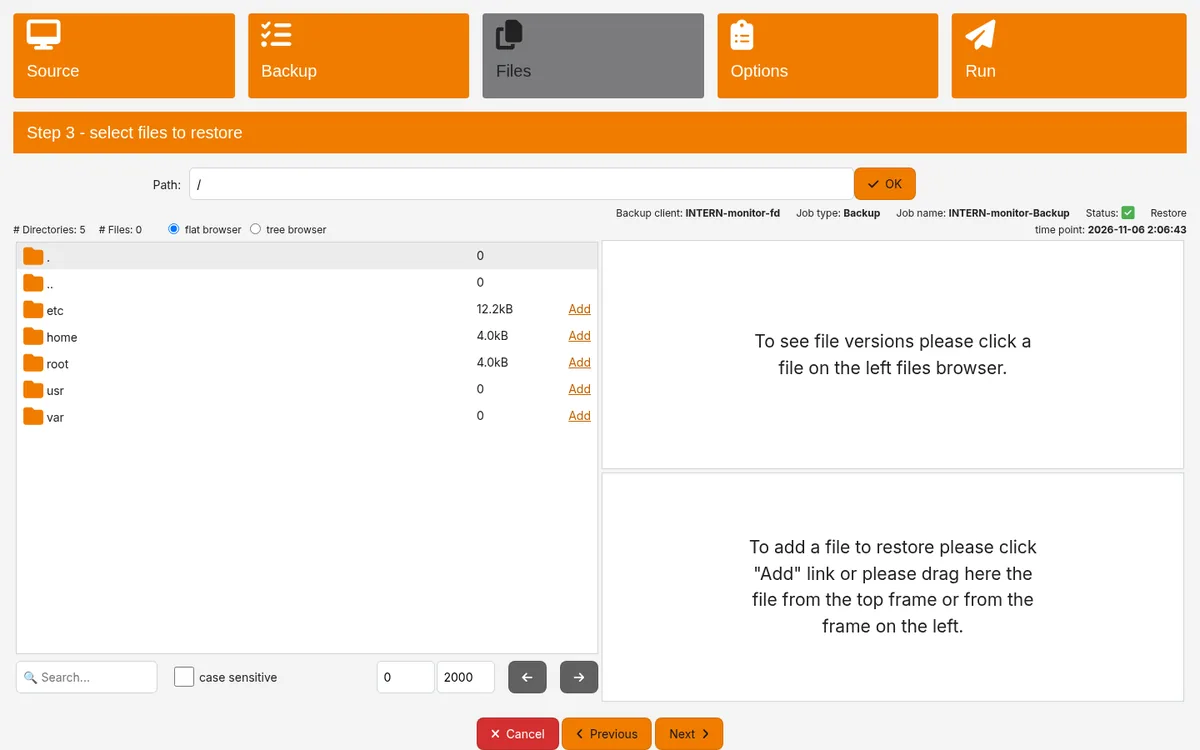
Everything at a glance. The overview shows the result, data volume and number of files of the latest backup runs.Every run logged. Full and incremental backups with start time, duration, data volume and result.Retention according to plan. Separate storage areas per customer for daily, weekly, monthly and annual backups.Targeted restore. In the restore wizard we select the backup point, folders and files.Windows and Linux. The protected systems with software version and retention periods.
Views from our backup interface Bacularis. Names of customers, systems and jobs have been replaced with neutral labels for this illustration.
04
Your price: jobs and storage
Price calculator
Backup job
per protected server or system
€26.78 per backup job / month incl. 19% VAT
(€22.50 excl. VAT)
Backup storage
Billing is based on the backup jobs and the backup storage occupied.
4.76 ct per GB / month incl. 19% VAT
(4 ct excl. VAT)
Note
The price calculator requires JavaScript. We are also happy to prepare a quote for you directly:
Get in touch.
1Your backup
Set the number of backup jobs and the amount of storage. You see the price immediately.
Billing is based on the backup storage actually occupied. A backup job is the scheduled backup of one server or system.
All prices include statutory VAT; net prices for businesses in brackets. Our offers are aimed exclusively at businesses (entrepreneurs within the meaning of Section 14 of the German Civil Code, BGB).
05
Process in four steps
4 steps
01
Initial consultation
We clarify which servers, systems and databases are to be backed up and which route suits them.
02
Setup
We set up the backup, either in our data centre or on your systems on site.
03
Test restore
Before the backup goes into operation, we carry out a test restore. This shows that the restore works.
04
Operation
We monitor every backup run, test restores regularly and restore data for you when needed.
We run the backup ourselves, in data centres in Germany. We ourselves do not use a US hyperscaler; a cloud connection is set up only at your express request. We process your data as a processor under the GDPR.
Q.02Which software backs up my system?
We back up servers in our data centre with Proxmox Backup Server. Systems at your premises, such as practice and office servers, and databases such as MS SQL Server or MariaDB we back up with Bacula. The promise stays the same: your data is stored with us and stays there.
Q.03How is it billed?
A monthly flat fee per backup job plus the occupied backup storage, per GB and month. We discuss setup and support in the initial consultation and set them out in your quote.
Q.04What is a backup job?
The scheduled backup of one system, for example a server with its data and databases, on a fixed schedule and retention plan. If we back up several servers, each server is one job.
Q.05Can you also back up to a cloud such as AWS?
Technically, Bacula can also be connected to S3 storage such as AWS. We set this up at your express request. We do not recommend it: for the sake of data sovereignty, your backups are best kept where we operate them ourselves — in data centres in Germany.
Q.06Can I restore data myself?
With the Bacula backup, yes — if you wish, via a web portal with two-factor sign-in. Otherwise we restore for you, from individual files to an entire server.
[ Managed Backup ]
Initial consultation
Your data. With us.
Tell us which servers, systems and databases you want to back up, and we will show you the best way to do it.